 Key Spammer
Press a key on a timer
Any interval from 10 milliseconds upwards. Letters, digits, function keys F1 to F24, arrows, modifiers, the numeric keypad, punctuation and media keys are all supported.
Now on the Microsoft Store
Key Spammer presses a key or clicks the mouse for you, over and over, into whichever application you choose. Set the rate, press Start, and get on with something else.
One-time purchase, €4.99. Outside the euro area the Store shows the price in your own currency. The app itself has no subscription, no ads, no accounts and no tracking.
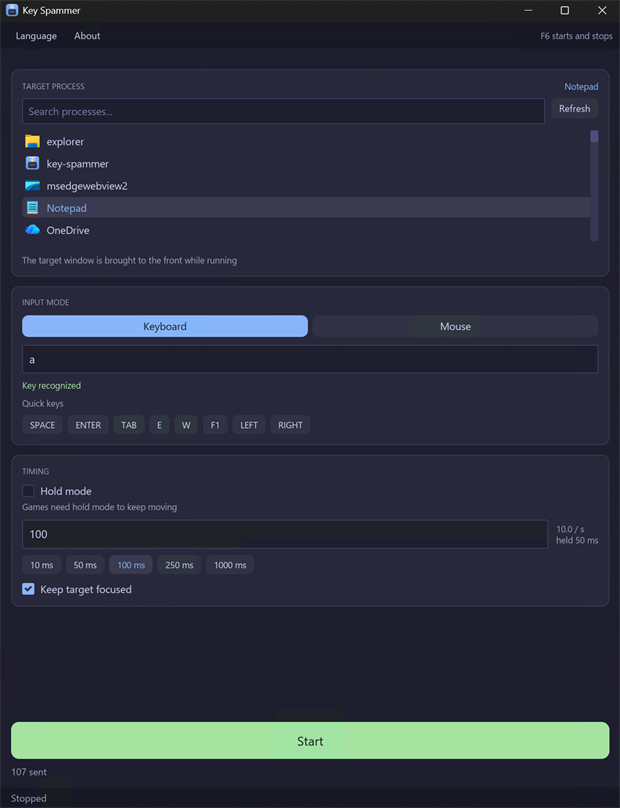
Four ways to send input, and one shortcut that works everywhere.
Any interval from 10 milliseconds upwards. Letters, digits, function keys F1 to F24, arrows, modifiers, the numeric keypad, punctuation and media keys are all supported.
For movement in a game, or anything else that responds to a key being held rather than tapped. It is released cleanly when you stop.
Left, right or middle button, at the cursor position. Point where you want the clicks and leave the pointer there.
The same idea as holding a key, for drag operations and anything that responds while a button is down.
The shortcut is registered with Windows, so it works while your game or application has focus. You never have to switch back.
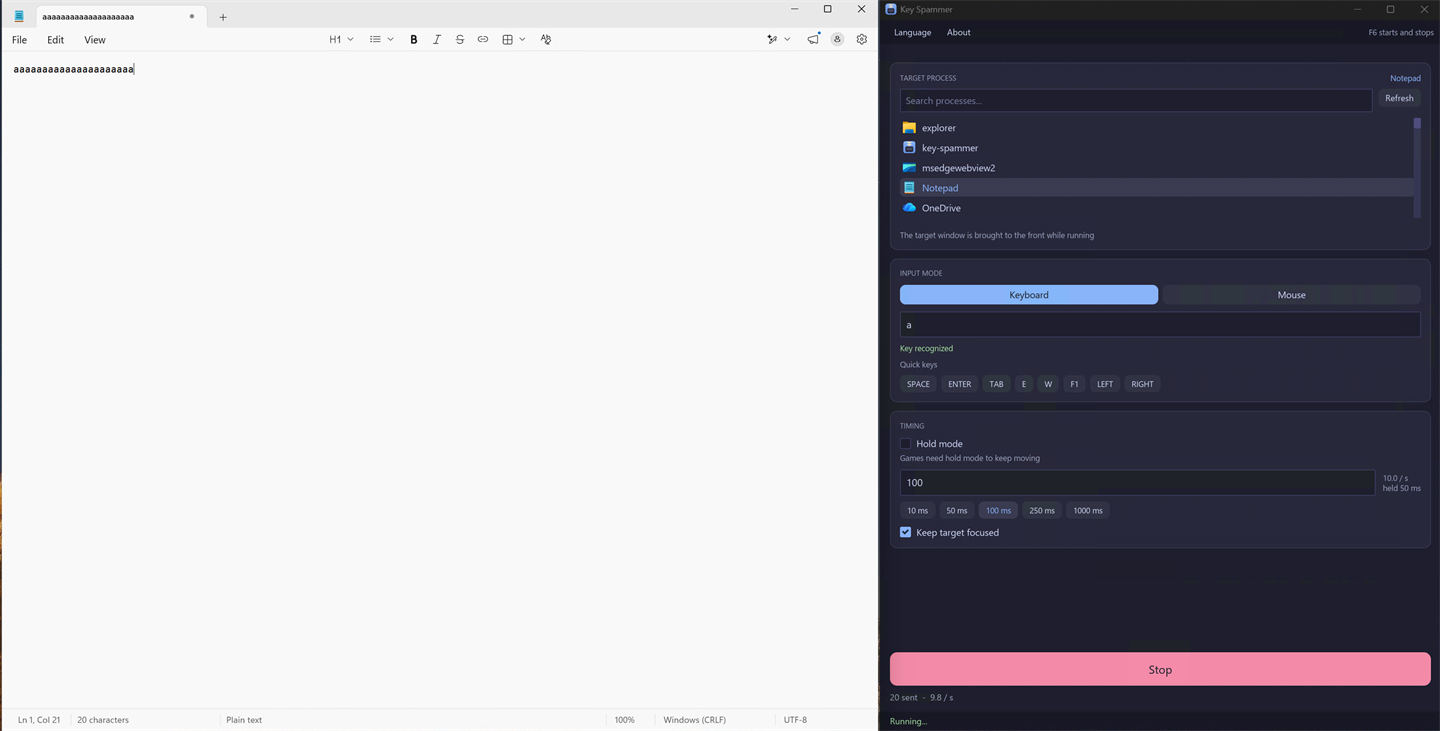
A live count of input sent and the rate it is really achieving, plus a plain reason whenever something blocks it. It never pretends to run.
Most auto clickers fail in games for two specific reasons. Key Spammer was built around both of them.
Windows delivers keystrokes to whichever window holds the keyboard focus, so sending input is only half the job. Key Spammer finds the real main window of the application you picked, brings it to the front, waits until the switch has actually happened, and only then starts sending. Skipping that wait is why some tools send their first keystrokes into their own window.
Keys go out as scancodes, the hardware-level codes a physical keyboard reports, rather than as virtual key codes. Many games read input at that level and ignore anything else entirely.
A game samples the keyboard once per rendered frame, roughly every 17 milliseconds at 60 frames per second. A press and release that both happen between two frames never existed as far as the game is concerned. Key Spammer holds each press for part of the cycle instead, which is the difference between a character that moves and one that does not.
Worth knowing before you install it, rather than after.
Automated input can get you banned. It breaks the rules of many online games and services, and using Key Spammer with them can get your account suspended or permanently banned. Only use it where it is allowed. You do so at your own risk, and Eiliko Oy accepts no liability for the consequences.
Key Spammer contains no networking code at all. Not disabled, not opt-out: absent. It cannot send anything anywhere even in principle, and its package requests no network permission from Windows.
One exception, stated plainly. If you deliberately set the
KS_DEBUG_LOG environment variable, the app writes a
troubleshooting log to your temporary folder. It stays on your computer and is
never transmitted. Full detail is in the
privacy policy.
It is a one-time purchase of €4.99. That is the price in the euro area. Elsewhere the Microsoft Store shows the exact price in your own currency before you buy. There is no subscription, no advertising, no accounts and nothing further to buy inside the app: you pay once and that is the end of it.
With most, yes. Keys are sent as scancodes, the way a physical keyboard reports them, because games commonly ignore input sent any other way. Each press is also held briefly rather than tapped, so a game that reads the keyboard once per frame actually sees it. Some games run anti-cheat software that rejects all synthetic input, and no tool can get past that.
Yes. Those apps decide you are away by asking Windows how long it has been since the last keyboard or mouse input, and Key Spammer sends input the way a keyboard does, so that counter keeps being reset and the status stays active. Two things are worth knowing before relying on it. The target window is brought to the front while the app runs, so the computer is not free for other work in the meantime, and whatever is in front is what receives the keystrokes — point it at something harmless, an empty Notepad window rather than the chat app itself. And activity alone changes nothing about a status you set by hand, or about a computer that is locked.
Yes, in many online games and services. Automated input breaks their rules and can get an account suspended or permanently banned. Check the rules of anything you use it with. You use it at your own risk, and Eiliko Oy accepts no liability for the consequences.
No. It sends input, it does not observe it. There is no keyboard hook and it does not read keyboard state. The single exception is the F6 shortcut, which Windows itself registers so the operating system can notify the app of that one key. It cannot see any other key you press, in any application.
Down to a 10 millisecond interval, which is 100 times a second. The app shows the rate it is actually achieving alongside the rate you asked for, because the real limit is usually the receiving application rather than Key Spammer.
The usual cause is privilege. If the target application runs as administrator, Windows blocks input from a program that does not, so Key Spammer has to run as administrator too. It tells you when this happens rather than appearing to run. The other common cause is a game with anti-cheat that rejects synthetic input outright.
Windows 10 version 1809 and later, and Windows 11. Builds are available for x64 and ARM64. There is no macOS or Linux version, because sending input into another application's window is a Windows capability with no equivalent elsewhere.
A one-time purchase of €4.99 from the Microsoft Store.
Published by Eiliko Oy. Windows 10 version 1809 or later, and Windows 11. Available for x64 and ARM64.